Understanding the Psychology of Colour in Web Design

Colour psychology in web design affects how users feel and interact with a site. By strategically using colours—like blue for trust or red for urgency—small businesses can create an engaging, professional online presence that aligns with their goals and encourages desired actions from visitors.

The Psychology of Colour in Web Design: How Colour Choices Influence User Behaviour

In web design, colour does far more than make a website look attractive; it has a significant psychological impact on visitors’ emotions, behaviours, and interactions with a site. For small businesses and sole traders, a well-chosen colour scheme can set a professional tone, build trust, and encourage specific actions like purchasing or subscribing to a newsletter. This article explores how colours evoke specific emotions and how to use them to enhance user engagement and conversion rates.

  1. The Basics of Color Psychology in Web Design

Colour psychology is the study of how colours affect human mood and behaviour. In web design, understanding this effect is essential, as your website is often the first interaction users have with your business. The right colour palette can create positive first impressions, foster emotional connections, and even drive decision-making.

Consider the “colour wheel” as a guide: hues on the red side are considered warm, while those on the blue side are cool. Warm colours are often associated with energy and urgency, while cool colours convey calmness and professionalism. Each colour has unique associations that can evoke particular responses:

  • Warm Colors (Red, Orange, Yellow): Energetic, attention-grabbing
  • Cool Colors (Blue, Green, Purple): Calming, trustworthy, and stable
  • Neutral Colors (Black, White, Gray): Minimalist, sophisticated, or balanced
  1. Breaking Down Colors and Their Emotional Influence

Each colour comes with its own set of psychological associations and can be utilized in web design to support specific brand messages. Here’s a breakdown of common colours and the emotions they evoke:

Red: Urgency, Passion, and Action

Red is one of the most intense colours, often used to convey urgency, excitement, and passion. It’s commonly seen in call-to-action (CTA) buttons, sale banners, and subscription forms. Red grabs attention quickly and can encourage users to act. However, too much red can feel overwhelming, so it’s best used in moderation.

Use Case for Small Businesses: Red is ideal for e-commerce sites, especially if you want to highlight a limited-time offer or CTA buttons where you want users to take immediate action, such as “Buy Now” or “Subscribe.”

Blue: Trust, Calm, and Stability

Blue is widely used by financial institutions, healthcare providers, and tech companies because of its calming and trustworthy feel. It’s also known for reducing tension and is easy on the eyes, making it ideal for backgrounds or main branding colours.

Use Case for Small Businesses: If your service involves building long-term client relationships, such as consulting or financial advice, incorporating blue into your web design can help establish credibility and trust.

Green: Growth, Health, and Balance

Green is often associated with nature, health, and growth, making it a popular choice for businesses in health, wellness, or eco-friendly industries. Green conveys relaxation and can also indicate success, making it a great colour for financial sectors as well.

Use Case for Small Businesses: Green is an excellent choice for small health and wellness brands, eco-conscious services, or businesses looking to establish a peaceful, welcoming environment.

Yellow: Optimism, Warmth, and Attention

Yellow evokes positivity and happiness, often used to make users feel welcome or excited. It works well as an accent colour to attract attention without being as overwhelming as red. However, too much yellow can be straining on the eyes.

Use Case for Small Businesses: Use yellow as an accent colour in sections where you want to convey energy or positivity, such as service introductions or testimonial sections.

Black and White: Modern, Sophisticated, and Balanced

Black and white are powerful neutrals, often used together to create a sophisticated, modern look. Black adds drama and elegance, while white maintains a minimalist, clean feel. Together, they can create a balanced, professional aesthetic.

Use Case for Small Businesses: Black and white work well for creative professionals, consultants, and brands focused on modern, high-end appeal.

  1. Applying Color Theory to Website Elements

To leverage colour effectively, consider the elements of your website where colour can make the most impact:

  • Navigation Bars and Headers: These are often the first things users see, so choosing a colour that aligns with your brand identity is essential. Blue and green are good choices for professionalism, while orange and yellow can create warmth and approachability.
  • Call-to-Action Buttons: CTAs are crucial for conversions. Using contrasting colours, like red or orange, can draw attention to these buttons and encourage users to take action. Avoid using colours that blend into the background or primary colour scheme, as this may cause users to overlook them.
  • Backgrounds: A website’s background sets the stage for all other elements. Cool colours like light blue, grey, or white create a calming and professional atmosphere, while a subtle pastel green can add freshness.
  • Text Colors: The legibility of text is critical. Black and dark grey are usually safe bets for readability on light backgrounds, while white text works well on darker or coloured backgrounds. Aim for contrast to ensure readability across all devices.
  1. Choosing Colors Based on Target Audience and Industry

Understanding your target audience is key when selecting your colour palette. Different demographics respond to colours in unique ways. For instance, younger audiences may respond well to brighter, more vibrant colours, while older audiences may prefer classic and subdued shades. Here are some audience-specific suggestions:

  • Young Audiences: Consider vibrant colours like red, yellow, or bright blue, which convey energy and excitement.
  • Professionals and Business Clients: Use cool, muted tones like blue, grey, or white to create a professional appearance.
  • Health and Wellness Industry: Greens and blues work well to foster trust and a sense of calmness.
  • Luxury or High-End Brands: Black, dark green and gold are commonly associated with luxury and can be used sparingly to create a sophisticated brand identity.
  1. The Role of Cultural Context in Color Perception

It’s important to remember that colour perceptions can vary significantly across different cultures. For instance:

  • Red can symbolize good fortune in China but represents danger in many Western cultures.
  • White is associated with purity in Western cultures, while in some Eastern cultures, it’s associated with mourning.
  • Purple represents royalty in many Western societies but may not hold the same connotation in other cultures.

If you’re designing for a culturally diverse audience, be mindful of these nuances and consider using a colour palette that is versatile and widely accepted.

  1. Creating Color Harmony: Balancing and Testing Colors

Using colour harmoniously on a website is key to making it visually appealing and functional. Overusing one colour can lead to fatigue, while a random mix can cause confusion. Here are a few tips to create a balanced colour scheme:

  • Choose a Primary Color: Select one main colour that best represents your brand’s core message.
  • Select Complementary Colors: Use colours that complement your primary colour to highlight important sections or add depth.
  • Consider the 60-30-10 Rule: This rule is a classic design approach where 60% of the design is the primary colour, 30% is a complementary colour, and 10% is an accent colour.

Once you’ve selected your colour scheme, conduct A/B testing to evaluate user responses. Colour can affect metrics such as bounce rate, time spent on site, and conversion rate, so experimenting can help you find the most effective choices.

  1. Case Studies: Color Psychology in Action

Let’s look at how successful brands utilize colour psychology to influence user behaviour and establish brand identity:

  • Coca-Cola: Coca-Cola uses red to convey excitement and energy, perfectly aligning with its brand message of fun and liveliness.
  • Facebook: With blue as its primary colour, Facebook aims to create a sense of trust and community, aligning with its goal to connect people worldwide.
  • Whole Foods: Using green extensively, Whole Foods emphasizes its commitment to health, nature, and eco-friendliness, appealing to consumers who value sustainability.

As a small web designer, draw inspiration from these brands and consider how their colour choices support their message. You don’t have to mimic their schemes but can apply similar principles in a way that resonates with your client’s goals.

  1. Final Thoughts: Using Color to Achieve Business Goals

For small businesses, an effective colour strategy can be a powerful tool. By understanding colour psychology and applying it thoughtfully, you can create websites that not only look appealing but also encourage engagement, trust, and action. Whether you're designing for a health-focused brand, a trendy retail business, or a professional services provider, a well-thought-out colour palette can set the right tone and influence user behaviour positively.

Incorporate colours strategically to improve navigation, highlight key actions, and establish an emotional connection. When done well, colour is more than just an aesthetic choice; it’s a way to drive success and make a lasting impact on users.
ElevenLabs Review for Content Creators: AI Voiceovers That Actually Sound Human

AI voice technology has improved dramatically over the last few years. What once sounded robotic and unnatural has evolved into something surprisingly realistic, useful, and in many cases almost indistinguishable from genuine human narration.

One platform leading that shift is ElevenLabs.

For YouTubers, podcasters, bloggers, educators, filmmakers, and online creators, ElevenLabs has quickly become one of the most talked-about AI tools available today. Its realistic text-to-speech engine, voice cloning system, and multilingual dubbing tools are changing the way creators approach narration and audio production.

As someone who creates photography and video content regularly, I’ve personally found ElevenLabs incredibly useful — particularly for voiceovers in YouTube videos. Rather than replacing creativity, it has helped streamline part of the production process that I often found frustrating and time-consuming.

In this article, I’ll explain what ElevenLabs is, the services it offers, why so many content creators are using it, and how I personally use it within my own workflow.

What Is ElevenLabs?

ElevenLabs is an AI-powered voice generation platform specialising in realistic speech synthesis and voice cloning.

The platform allows users to generate natural-sounding speech from typed text using AI-generated voices or custom-trained voice models. Unlike older text-to-speech systems that often sounded flat or robotic, ElevenLabs focuses heavily on emotional realism, pacing, tone, and natural speech patterns.

The result is AI narration that feels significantly more human than traditional voice synthesis software.

Because of this, ElevenLabs has become increasingly popular among:

  • YouTubers
  • Podcasters
  • Filmmakers
  • Businesses
  • Course creators
  • Bloggers
  • Social media creators
  • Audiobook producers
  • Marketing agencies

The platform is particularly attractive to solo creators and small businesses because it removes many of the barriers associated with professional voice production.

What Services Does ElevenLabs Offer?

One reason ElevenLabs has grown so quickly is that it offers far more than simple text-to-speech functionality.

AI Text-to-Speech

The platform’s core feature is AI-generated narration.

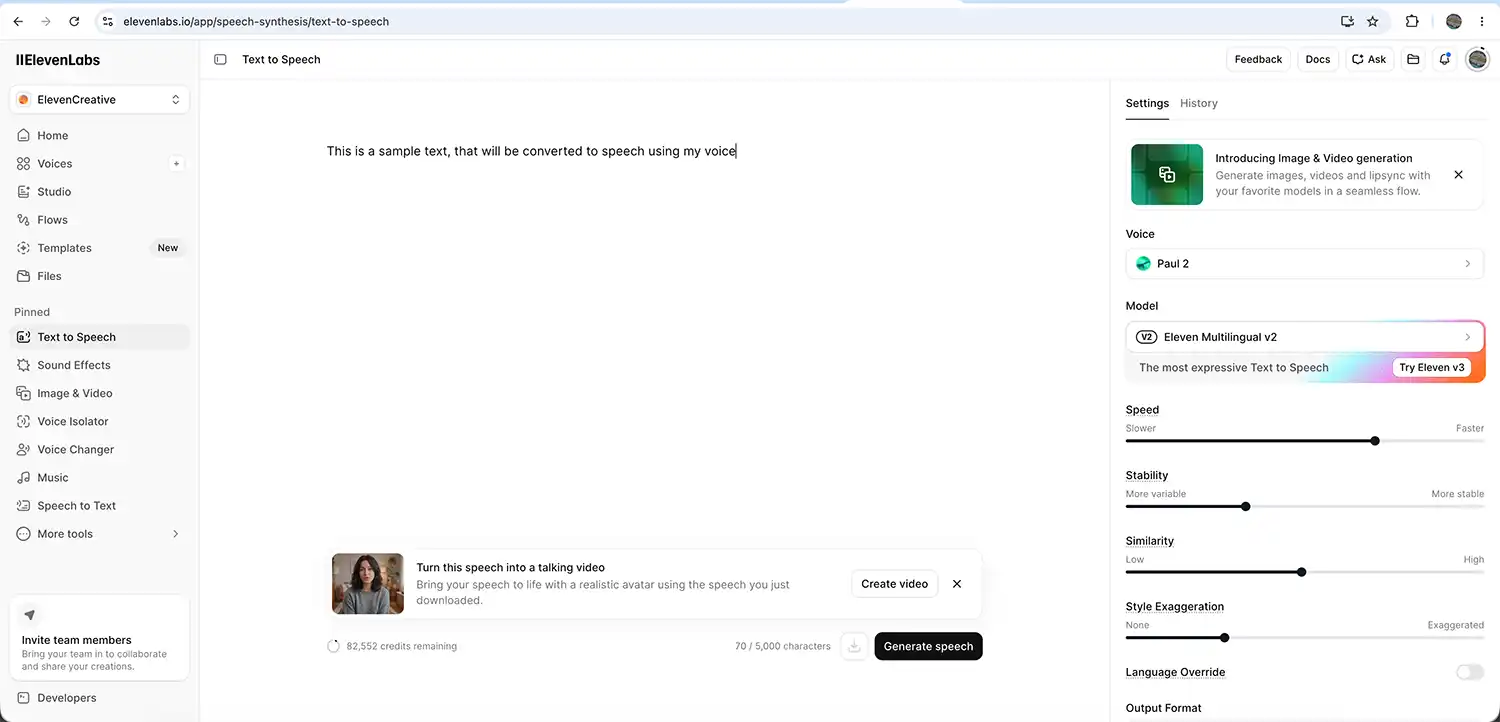
Users can type text into the editor and generate spoken audio using a range of realistic AI voices. These voices can vary in tone, accent, pacing, style, and emotional delivery.

For creators producing YouTube videos, explainer videos, TikToks, podcasts, or training material, this can save a huge amount of time.

Voice Cloning

Voice cloning is arguably the standout feature.

Users can train ElevenLabs using recordings of their own voice to create a custom AI voice model. Once trained, the platform can generate narration that sounds remarkably similar to the original speaker.

This is the feature I personally use the most.

Rather than using a completely artificial voice, I trained ElevenLabs using samples of my own voice. This allows me to type scripts while still keeping narration that sounds natural and personal to my videos.

elevenlabs text to voice dashboard

Multilingual Dubbing

ElevenLabs also offers AI dubbing and translation tools.

This allows creators and businesses to translate spoken content into multiple languages while maintaining much of the original tone and delivery style.

For larger YouTube channels or businesses with international audiences, this could become an extremely valuable tool.

AI Audio Tools

The company has also expanded into additional AI audio services, including conversational AI and audio generation features.

While most creators will likely focus on the narration side of the platform, it’s clear ElevenLabs is positioning itself as a much broader AI audio company.

Why Content Creators Are Using ElevenLabs

For many creators, producing voiceovers can be one of the slowest and most frustrating parts of video production.

Even when you know exactly what you want to say, recording narration perfectly can take far longer than expected.

Background noise, microphone setup, pacing issues, vocal fatigue, pronunciation mistakes, and repeated retakes can all slow the process down considerably.

This is one reason why AI narration tools are becoming increasingly popular.

In my own case, I occasionally stutter on certain words or get stuck repeating sentences multiple times trying to get the delivery right. The more takes I do, the worse it sometimes becomes.

Using ElevenLabs has genuinely helped reduce that frustration.

I trained the system using my own voice, so now I can type my narration into the platform and generate a voiceover that sounds like me. It keeps the tone and personality of my own voice while removing much of the stress involved with recording multiple takes.

For reflective or cinematic-style YouTube videos, I’ve found this workflow particularly useful.

How I Use ElevenLabs in My Own Workflow

My process is fairly straightforward.

Once I’ve edited together the visuals for a video, I’ll usually write the narration afterwards so the pacing matches the footage.

I then paste the script into ElevenLabs and generate the voiceover using my trained voice model.

Most of the time, the results are genuinely impressive.

Occasionally certain words may sound slightly robotic or unnatural, but I’ve found this is usually easy to fix by regenerating the line or slightly adjusting punctuation and sentence structure.

Shorter, conversational sentences tend to sound more natural than overly formal writing.

For me, the platform works best when I write exactly how I would normally speak in conversation.

The end result often sounds smoother and more relaxed than if I had spent an hour repeatedly re-recording narration late at night.

Why ElevenLabs Makes Sense for Small Creators

One reason I think ElevenLabs is particularly useful is because many small creators are handling every aspect of production themselves.

Filming, editing, thumbnails, SEO, blogging, colour grading, music licensing, and social media all take time.

Voiceovers can easily become another bottleneck.

Large creators often have dedicated audio setups, editors, or voice talent available. Smaller creators typically do not.

That’s why tools that streamline production can make a genuine difference.

Rather than spending excessive time fighting technical hurdles, creators can focus more energy on storytelling, creativity, and producing better content overall.

AI Voiceovers and Authenticity

Some creators understandably worry that AI narration removes authenticity from content.

Personally, I think it depends entirely on how the technology is used.

If you are using your own trained voice model ethically and transparently, I don’t see it as fundamentally different from using editing software, colour grading plugins, or AI-assisted noise reduction.

In my own videos, the narration still sounds like me because it is based on my own voice recordings.

The AI is simply helping improve efficiency and consistency.

SEO and Content Creation Benefits

Interestingly, tools like ElevenLabs may also indirectly help with SEO and audience growth.

Consistent uploads are important for platforms like YouTube and blogs, and reducing production friction can help creators publish content more regularly.

Additionally, clearer narration can improve viewer retention and accessibility.

Creators can also repurpose written blog content into spoken narration more easily, helping turn articles into videos, podcasts, or social media clips.

For businesses and website owners, this opens up opportunities for:

  • AI voiceovers for landing pages
  • Narrated tutorials
  • Product explainers
  • Accessibility improvements
  • Social media content
  • Podcast creation
  • Training videos

Is ElevenLabs Worth It?

For many creators, I think the answer is yes.

Like any AI tool, it is not perfect. Occasionally speech generation can sound slightly artificial, and some editing or regeneration may still be needed.

However, the quality is already remarkably good, and for creators who regularly produce narration-heavy content, the time savings alone can make it worthwhile.

The platform feels especially valuable for creators who:

  • Struggle with voice recording confidence
  • Stutter or trip over words
  • Produce regular narration-heavy videos
  • Want more polished voiceovers
  • Need multilingual content
  • Work alone without production teams

Final Thoughts

AI tools are becoming increasingly common within creative industries, and voice generation is likely to become a standard part of content production over the next few years.

For me personally, ElevenLabs has become a genuinely useful creative tool rather than a gimmick.

It helps reduce frustration, speeds up production, and allows me to focus more on storytelling and visual creativity instead of endlessly repeating voiceover takes.

While it occasionally produces slightly robotic delivery, regenerating the line usually resolves the issue quickly.

For YouTubers, podcasters, filmmakers, bloggers, and online businesses looking to improve narration quality or streamline production workflows, ElevenLabs is absolutely worth exploring — particularly if you create content regularly and value efficiency without losing personality. If you want to try Elevenlabs try my affliate link here

Frequently asked questions

What is ElevenLabs?

ElevenLabs is an AI voice generation platform that specialises in realistic text-to-speech, voice cloning, AI narration, and multilingual dubbing. It allows creators and businesses to generate natural-sounding voiceovers from typed text.

Is ElevenLabs good for YouTube creators?

Yes. ElevenLabs is particularly useful for YouTubers who create narration-heavy videos, tutorials, documentaries, podcasts, or cinematic content. It can help save time while producing professional-sounding voiceovers.

Can ElevenLabs clone your own voice?

Yes. ElevenLabs allows users to train a custom AI voice model using recordings of their own voice. Once trained, the platform can generate narration that sounds remarkably similar to the original speaker.

How accurate is ElevenLabs voice cloning?

In many cases, the voice cloning is surprisingly realistic. Tone, pacing, and speech patterns can sound very natural, although occasional robotic phrases may still occur. Regenerating the line or adjusting punctuation often improves the result significantly.

Why do content creators use ElevenLabs?

Content creators use ElevenLabs because it can:

  • Reduce voiceover recording time
  • Improve narration consistency
  • Help creators who struggle with repeated takes
  • Speed up video production workflows
  • Create professional AI-generated narration
  • Support multilingual content creation
Does ElevenLabs sound robotic?

Most of the time, ElevenLabs sounds impressively natural compared to older text-to-speech software. Occasionally certain words or phrases may sound slightly artificial, but regenerating the audio or changing sentence structure usually fixes this.

Can ElevenLabs help if you struggle recording voiceovers?

Yes. This is one reason many creators use it. If you struggle with stuttering, pronunciation, confidence, background noise, or vocal fatigue, ElevenLabs can make narration production much easier while still keeping a natural-sounding voice.

Is ElevenLabs better than traditional text-to-speech software?

In terms of realism and emotional delivery, many creators feel ElevenLabs is significantly more advanced than traditional robotic text-to-speech systems. Its natural pacing and voice quality are among the reasons it has become so popular.

Can businesses use ElevenLabs?

Yes. Businesses can use ElevenLabs for:

  • Website voiceovers
  • Product explainers
  • Online courses
  • Social media content
  • Customer support systems
  • Training videos
  • Podcast production
  • Accessibility improvements
Is ElevenLabs worth paying for?

For creators or businesses producing regular voiceover content, many people will likely find it worthwhile due to the time savings and audio quality. The value depends on how frequently you create narrated content.

Does ElevenLabs support multiple languages?

Yes. ElevenLabs includes multilingual voice generation and dubbing tools, making it useful for creators and businesses wanting to reach international audiences.

How do I get more natural results in ElevenLabs?

A few simple things can help:

  • Write conversationally
  • Use shorter sentences
  • Add commas and pauses naturally
  • Regenerate awkward lines
  • Avoid overly formal wording

Typing how you genuinely speak often produces the most realistic narration.

Can ElevenLabs be used for podcasts?

Yes. Many creators use ElevenLabs for podcast intros, narration segments, storytelling podcasts, educational content, and scripted productions.

Is ElevenLabs useful for solo creators?

Absolutely. Solo creators often handle filming, editing, thumbnails, SEO, blogging, and social media themselves. ElevenLabs can reduce one major production bottleneck by simplifying the voiceover process.