A Step-by-Step Guide to Redesigning Your Small Business Website

Redesigning your small business website can improve its look, usability, and performance. Start by setting clear goals, auditing your current site, and researching your audience. Plan the redesign carefully, focusing on mobile-friendly, SEO-optimised, and user-friendly features. Save time and get professional results by hiring a local web designer who understands your needs and community. After testing and launching the new site, maintain it with regular updates and monitoring.

Your time is valuable—partnering with a web design expert ensures a high-quality site while letting you focus on growing your business. Ready to refresh your website? Reach out today!

A Step-by-Step Guide to Redesigning Your Small Business Website

Redesigning your small business website can feel daunting, especially if you’re juggling a busy schedule. Your website is the digital face of your business, so keeping it fresh, functional, and aligned with your goals is essential. This step-by-step guide will help you understand the process and show why partnering with a local web designer can save you time and achieve better results.

Why Redesign Your Website?

A website redesign is about more than aesthetics. It’s an opportunity to improve your site's usability, functionality, and performance. Here are a few reasons why you might consider redesigning your website:

  • Outdated design: Your site looks old or doesn’t reflect your brand anymore.
  • Poor user experience: Visitors struggle to find information or navigate your site.
  • Low performance: Your site is slow, unresponsive, or not mobile-friendly.
  • Changes in business focus: Your current site doesn’t showcase new services or products.
  • SEO issues: Your site doesn’t rank well on Google, limiting your reach.

Step 1: Set Clear Goals

Before you start redesigning, outline what you want to achieve. Examples of goals include:

  • Increasing website traffic and leads.
  • Improving the user experience for mobile visitors.
  • Showcasing new services or testimonials.
  • Updating your visual branding.

Having clear objectives will guide the redesign process and keep your focus on what matters most.

Step 2: Audit Your Existing Website

Take stock of your current website’s strengths and weaknesses. Evaluate:

  1. Design: Does your site look modern and professional?
  2. Navigation: Can users find information easily?
  3. Content: Is the text engaging and up to date?
  4. Performance: Does the site load quickly and work on all devices?

This audit will help you identify areas to improve and what to retain in the redesign.

Step 3: Research Your Audience

Your website should cater to your ideal customers. To understand their needs:

  • Review your Google Analytics to see how visitors interact with your site.
  • Conduct surveys or ask for feedback from current customers.
  • Research competitor websites to identify industry trends.

Step 4: Plan the Redesign

Create a detailed plan that outlines the following:

  • Site structure: Decide what pages to include and how they’ll be organized.
  • Features: Do you need a blog, booking system, or e-commerce capabilities?
  • Design elements: What colours, fonts, and imagery will reflect your brand?
  • Timeline: Set realistic deadlines for each stage of the redesign.

A clear plan will ensure you stay on track and avoid unnecessary delays.

Step 5: Choose a Local Web Designer

Redesigning your website is a significant project that requires expertise and time—resources you may not have to spare as a busy small business owner. This is where hiring a local web designer becomes invaluable.

Why Work with a Local Web Designer?

  1. Personalised Service: Local designers understand your community and can create a site that resonates with your target audience.
  2. Face-to-face collaboration: Discussing your needs in person leads to clearer communication and faster progress.
  3. Time-Saving: A professional designer can handle everything, freeing you to focus on running your business.
  4. SEO Benefits: Local designers often have expertise in optimizing for location-specific searches.
  5. Supporting Local Economy: Investing in local services contributes to your community.

Step 6: Focus on Mobile-Friendly and Responsive Design

With over 60% of web traffic from mobile devices, having a mobile-friendly site is non-negotiable. Ensure your redesigned website:

  • Adapts seamlessly to different screen sizes.
  • Features touch-friendly navigation.
  • It loads quickly, even on slower mobile networks.

Step 7: Create High-Quality Content

Your content is as important as your design. Update your text, images, and videos to align with your brand and goals. Tips for great content include:

  • Keep it concise: Visitors skim, so make your text easy to read.
  • Use professional visuals: High-quality images and videos boost credibility.
  • Include calls to action (CTAs): Encourage visitors to contact you, book a service, or buy a product.

Step 8: Test Before Launch

Before going live, thoroughly test your redesigned website to ensure everything works as expected. Check for:

  • Broken links and missing pages.
  • Compatibility with different browsers (Chrome, Safari, etc.).
  • Mobile responsiveness.
  • Loading speed.

Testing ensures your website provides a seamless experience from day one.

Step 9: Launch and Promote

Once your site is ready, launch it with a promotional plan. Announce the redesign on social media, via email newsletters, and with a blog post. Encourage visitors to explore your new site and share feedback.

Step 10: Maintain Your Website

Redesigning is just the start. To keep your site performing well:

  • Update content regularly to stay relevant.
  • Monitor analytics to track visitor behaviour.
  • Perform routine maintenance to prevent issues.

The Value of Your Time

As a small business owner, time is one of your most valuable assets. Learning web design, troubleshooting technical issues, and managing a redesign can take hours away from serving your customers and growing your business. By partnering with a professional web designer, you save time, reduce stress, and ensure your site meets the highest standards.

Conclusion

Redesigning your website is a smart investment in your business’s future. By setting clear goals, working with a local web designer, and focusing on user-friendly design, you can create a site that attracts customers and drives growth.

Ready to get started? As a freelance website designer based in Devon, I specialize in creating modern, SEO-optimised websites for small businesses and sole traders. Contact me today to discuss your website redesign and see how I can help bring your vision to life!
ElevenLabs Review for Content Creators: AI Voiceovers That Actually Sound Human

AI voice technology has improved dramatically over the last few years. What once sounded robotic and unnatural has evolved into something surprisingly realistic, useful, and in many cases almost indistinguishable from genuine human narration.

One platform leading that shift is ElevenLabs.

For YouTubers, podcasters, bloggers, educators, filmmakers, and online creators, ElevenLabs has quickly become one of the most talked-about AI tools available today. Its realistic text-to-speech engine, voice cloning system, and multilingual dubbing tools are changing the way creators approach narration and audio production.

As someone who creates photography and video content regularly, I’ve personally found ElevenLabs incredibly useful — particularly for voiceovers in YouTube videos. Rather than replacing creativity, it has helped streamline part of the production process that I often found frustrating and time-consuming.

In this article, I’ll explain what ElevenLabs is, the services it offers, why so many content creators are using it, and how I personally use it within my own workflow.

What Is ElevenLabs?

ElevenLabs is an AI-powered voice generation platform specialising in realistic speech synthesis and voice cloning.

The platform allows users to generate natural-sounding speech from typed text using AI-generated voices or custom-trained voice models. Unlike older text-to-speech systems that often sounded flat or robotic, ElevenLabs focuses heavily on emotional realism, pacing, tone, and natural speech patterns.

The result is AI narration that feels significantly more human than traditional voice synthesis software.

Because of this, ElevenLabs has become increasingly popular among:

  • YouTubers
  • Podcasters
  • Filmmakers
  • Businesses
  • Course creators
  • Bloggers
  • Social media creators
  • Audiobook producers
  • Marketing agencies

The platform is particularly attractive to solo creators and small businesses because it removes many of the barriers associated with professional voice production.

What Services Does ElevenLabs Offer?

One reason ElevenLabs has grown so quickly is that it offers far more than simple text-to-speech functionality.

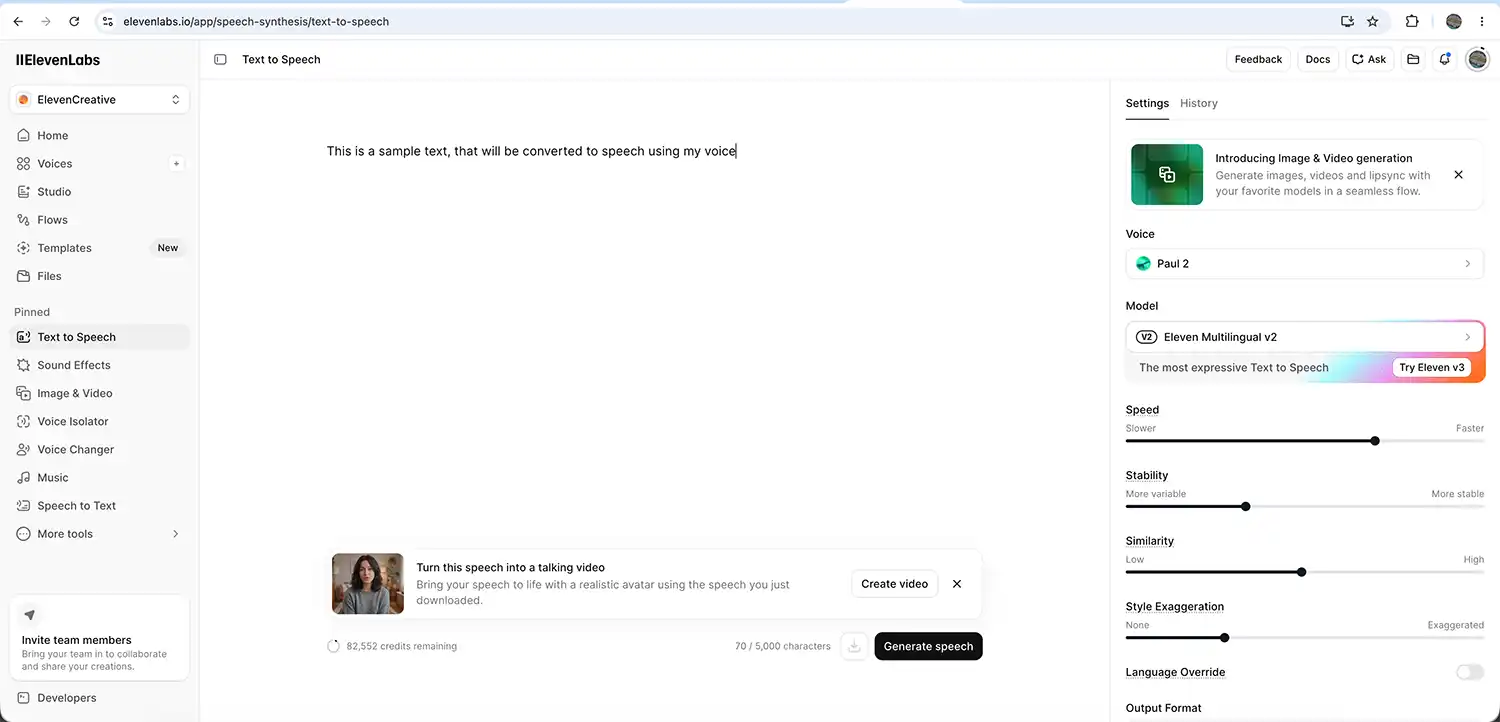
AI Text-to-Speech

The platform’s core feature is AI-generated narration.

Users can type text into the editor and generate spoken audio using a range of realistic AI voices. These voices can vary in tone, accent, pacing, style, and emotional delivery.

For creators producing YouTube videos, explainer videos, TikToks, podcasts, or training material, this can save a huge amount of time.

Voice Cloning

Voice cloning is arguably the standout feature.

Users can train ElevenLabs using recordings of their own voice to create a custom AI voice model. Once trained, the platform can generate narration that sounds remarkably similar to the original speaker.

This is the feature I personally use the most.

Rather than using a completely artificial voice, I trained ElevenLabs using samples of my own voice. This allows me to type scripts while still keeping narration that sounds natural and personal to my videos.

elevenlabs text to voice dashboard

Multilingual Dubbing

ElevenLabs also offers AI dubbing and translation tools.

This allows creators and businesses to translate spoken content into multiple languages while maintaining much of the original tone and delivery style.

For larger YouTube channels or businesses with international audiences, this could become an extremely valuable tool.

AI Audio Tools

The company has also expanded into additional AI audio services, including conversational AI and audio generation features.

While most creators will likely focus on the narration side of the platform, it’s clear ElevenLabs is positioning itself as a much broader AI audio company.

Why Content Creators Are Using ElevenLabs

For many creators, producing voiceovers can be one of the slowest and most frustrating parts of video production.

Even when you know exactly what you want to say, recording narration perfectly can take far longer than expected.

Background noise, microphone setup, pacing issues, vocal fatigue, pronunciation mistakes, and repeated retakes can all slow the process down considerably.

This is one reason why AI narration tools are becoming increasingly popular.

In my own case, I occasionally stutter on certain words or get stuck repeating sentences multiple times trying to get the delivery right. The more takes I do, the worse it sometimes becomes.

Using ElevenLabs has genuinely helped reduce that frustration.

I trained the system using my own voice, so now I can type my narration into the platform and generate a voiceover that sounds like me. It keeps the tone and personality of my own voice while removing much of the stress involved with recording multiple takes.

For reflective or cinematic-style YouTube videos, I’ve found this workflow particularly useful.

How I Use ElevenLabs in My Own Workflow

My process is fairly straightforward.

Once I’ve edited together the visuals for a video, I’ll usually write the narration afterwards so the pacing matches the footage.

I then paste the script into ElevenLabs and generate the voiceover using my trained voice model.

Most of the time, the results are genuinely impressive.

Occasionally certain words may sound slightly robotic or unnatural, but I’ve found this is usually easy to fix by regenerating the line or slightly adjusting punctuation and sentence structure.

Shorter, conversational sentences tend to sound more natural than overly formal writing.

For me, the platform works best when I write exactly how I would normally speak in conversation.

The end result often sounds smoother and more relaxed than if I had spent an hour repeatedly re-recording narration late at night.

Why ElevenLabs Makes Sense for Small Creators

One reason I think ElevenLabs is particularly useful is because many small creators are handling every aspect of production themselves.

Filming, editing, thumbnails, SEO, blogging, colour grading, music licensing, and social media all take time.

Voiceovers can easily become another bottleneck.

Large creators often have dedicated audio setups, editors, or voice talent available. Smaller creators typically do not.

That’s why tools that streamline production can make a genuine difference.

Rather than spending excessive time fighting technical hurdles, creators can focus more energy on storytelling, creativity, and producing better content overall.

AI Voiceovers and Authenticity

Some creators understandably worry that AI narration removes authenticity from content.

Personally, I think it depends entirely on how the technology is used.

If you are using your own trained voice model ethically and transparently, I don’t see it as fundamentally different from using editing software, colour grading plugins, or AI-assisted noise reduction.

In my own videos, the narration still sounds like me because it is based on my own voice recordings.

The AI is simply helping improve efficiency and consistency.

SEO and Content Creation Benefits

Interestingly, tools like ElevenLabs may also indirectly help with SEO and audience growth.

Consistent uploads are important for platforms like YouTube and blogs, and reducing production friction can help creators publish content more regularly.

Additionally, clearer narration can improve viewer retention and accessibility.

Creators can also repurpose written blog content into spoken narration more easily, helping turn articles into videos, podcasts, or social media clips.

For businesses and website owners, this opens up opportunities for:

  • AI voiceovers for landing pages
  • Narrated tutorials
  • Product explainers
  • Accessibility improvements
  • Social media content
  • Podcast creation
  • Training videos

Is ElevenLabs Worth It?

For many creators, I think the answer is yes.

Like any AI tool, it is not perfect. Occasionally speech generation can sound slightly artificial, and some editing or regeneration may still be needed.

However, the quality is already remarkably good, and for creators who regularly produce narration-heavy content, the time savings alone can make it worthwhile.

The platform feels especially valuable for creators who:

  • Struggle with voice recording confidence
  • Stutter or trip over words
  • Produce regular narration-heavy videos
  • Want more polished voiceovers
  • Need multilingual content
  • Work alone without production teams

Final Thoughts

AI tools are becoming increasingly common within creative industries, and voice generation is likely to become a standard part of content production over the next few years.

For me personally, ElevenLabs has become a genuinely useful creative tool rather than a gimmick.

It helps reduce frustration, speeds up production, and allows me to focus more on storytelling and visual creativity instead of endlessly repeating voiceover takes.

While it occasionally produces slightly robotic delivery, regenerating the line usually resolves the issue quickly.

For YouTubers, podcasters, filmmakers, bloggers, and online businesses looking to improve narration quality or streamline production workflows, ElevenLabs is absolutely worth exploring — particularly if you create content regularly and value efficiency without losing personality. If you want to try Elevenlabs try my affliate link here

Frequently asked questions

What is ElevenLabs?

ElevenLabs is an AI voice generation platform that specialises in realistic text-to-speech, voice cloning, AI narration, and multilingual dubbing. It allows creators and businesses to generate natural-sounding voiceovers from typed text.

Is ElevenLabs good for YouTube creators?

Yes. ElevenLabs is particularly useful for YouTubers who create narration-heavy videos, tutorials, documentaries, podcasts, or cinematic content. It can help save time while producing professional-sounding voiceovers.

Can ElevenLabs clone your own voice?

Yes. ElevenLabs allows users to train a custom AI voice model using recordings of their own voice. Once trained, the platform can generate narration that sounds remarkably similar to the original speaker.

How accurate is ElevenLabs voice cloning?

In many cases, the voice cloning is surprisingly realistic. Tone, pacing, and speech patterns can sound very natural, although occasional robotic phrases may still occur. Regenerating the line or adjusting punctuation often improves the result significantly.

Why do content creators use ElevenLabs?

Content creators use ElevenLabs because it can:

  • Reduce voiceover recording time
  • Improve narration consistency
  • Help creators who struggle with repeated takes
  • Speed up video production workflows
  • Create professional AI-generated narration
  • Support multilingual content creation
Does ElevenLabs sound robotic?

Most of the time, ElevenLabs sounds impressively natural compared to older text-to-speech software. Occasionally certain words or phrases may sound slightly artificial, but regenerating the audio or changing sentence structure usually fixes this.

Can ElevenLabs help if you struggle recording voiceovers?

Yes. This is one reason many creators use it. If you struggle with stuttering, pronunciation, confidence, background noise, or vocal fatigue, ElevenLabs can make narration production much easier while still keeping a natural-sounding voice.

Is ElevenLabs better than traditional text-to-speech software?

In terms of realism and emotional delivery, many creators feel ElevenLabs is significantly more advanced than traditional robotic text-to-speech systems. Its natural pacing and voice quality are among the reasons it has become so popular.

Can businesses use ElevenLabs?

Yes. Businesses can use ElevenLabs for:

  • Website voiceovers
  • Product explainers
  • Online courses
  • Social media content
  • Customer support systems
  • Training videos
  • Podcast production
  • Accessibility improvements
Is ElevenLabs worth paying for?

For creators or businesses producing regular voiceover content, many people will likely find it worthwhile due to the time savings and audio quality. The value depends on how frequently you create narrated content.

Does ElevenLabs support multiple languages?

Yes. ElevenLabs includes multilingual voice generation and dubbing tools, making it useful for creators and businesses wanting to reach international audiences.

How do I get more natural results in ElevenLabs?

A few simple things can help:

  • Write conversationally
  • Use shorter sentences
  • Add commas and pauses naturally
  • Regenerate awkward lines
  • Avoid overly formal wording

Typing how you genuinely speak often produces the most realistic narration.

Can ElevenLabs be used for podcasts?

Yes. Many creators use ElevenLabs for podcast intros, narration segments, storytelling podcasts, educational content, and scripted productions.

Is ElevenLabs useful for solo creators?

Absolutely. Solo creators often handle filming, editing, thumbnails, SEO, blogging, and social media themselves. ElevenLabs can reduce one major production bottleneck by simplifying the voiceover process.